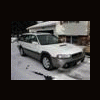
December 21, 200322 yr Originally posted by kenfb1 1998 OUTBACK LIMITED!! She's a beaut! How's she handle in the snow? Are those OEM wheels? They look like steelies with covers. Enjoy!
December 21, 200322 yr Author So far, so good in the snow this year. We had two pretty good storms so far and I haven't spun the wheels at all yet, even going up some pretty good hills around here. I bought a tire and wheel package from tirerack.com this year. I got Kumho 205/70-15in winter tires, oem 15in steel wheels and the wheel covers for a little over $400 delivered and ready to mount. I think this was a great investment. My stock alum. wheels are nice and safe in my garage and as a bonus I use one of them as my full size spare if needed. Even if I only get two years out of the winter tires I think it's worth it. The tires were only $45 each!! Ken
December 24, 200322 yr Sweet looking...just like mine! I have the same car, but just put on 205-75-15s. Needed a bit more clearance. I'm in Idaho, and our roads have snow on them from now until March or April! Love the Soob! In fact my in-laws just got a steal on a 93 Leg. Wagon for $500! They are in love with the car. Drive through snow banks, up hill driveways that have not been plowed, and anything for a challenge, just to see if it can make it. Gotta loe the Subarus!

Please sign in to comment
You will be able to leave a comment after signing in
Sign In Now