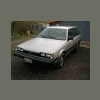
December 1, 200817 yr I got my first Subaru yesterday, saturday. It is a 1987 DL 4x4 5 Speed Wagon. Only 126,000 Miles on it. So heres the story. The car was given to me in trade for doing about $300 in work to my stepfathers truck, he got it in trade for demolishing an old mobile home. It had been sitting for about a year, so I threw a new/used battery in it and after a little cranking it fired right up. The water pump and alternator were replaced right before it was parked. It was parked because the older couple who owned could no longer safely drive it. So in all the car runs and drives great and needs almost nothing, just a tune up and new front CV's.
December 1, 200817 yr nice man,keep up the maintenance and it could last a very , very, very long time. until you get the bug to lift it,modify it beyond means.........then it will only last a long time.:lol:cheers, brian
December 1, 200817 yr Congratulations! and welcome to the wonderful world of Subaru! Looks like it is in pretty good shape (as compared to the ones around here) some good old fashioned basic maintenance and she will give you many years of reliable service. you mention the water pump being replaced just before it was parked - did it get new timing belts as well?? personally, i would go ahead and change them anyway since it was sitting for a while...
December 1, 200817 yr Author From the information Ive got it appears that they were not replaced, so I will be getting them done sooner than later
Please sign in to comment
You will be able to leave a comment after signing in
Sign In Now