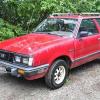
December 4, 200817 yr IM selling the first car i ever owned. I had it running 2 years ago but had a bad experience with low life mechanic. just never had time to get back to it. here is a link. ill be posting more pics if i get many people interested. http://www.ultimatesubaru.org/forum/showthread.php?t=93380
December 10, 200817 yr You see the pics I posted in your thread? The guy that owns that (might have sold it by now) had several GT's in his yard. I took a pic of a green one he had that was in ok shape. He said he wanted to sell it all. He had tons of cars, old Rovers...you name it - he had it. I'll see if I can find that pic. Maybe some day I'll get a GT

Please sign in to comment
You will be able to leave a comment after signing in
Sign In Now