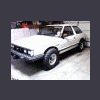
January 24, 200917 yr I just finished installing my new Weber carb and what a difference it makes. It is the first one I have done and only took about 2 hours. I put it on my 89 EA81 hatch. I highly recommend them. I had no problems with anything and it runs great. As soon as my LSD, rear discs, and rear springs and struts get here I'll put them in and hit the trails. Thanks guys for all your help. John
January 24, 200917 yr I just finished installing my new Weber carb and what a difference it makes. It is the first one I have done and only took about 2 hours. I put it on my 89 EA81 hatch. I highly recommend them. I had no problems with anything and it runs great. As soon as my LSD, rear discs, and rear springs and struts get here I'll put them in and hit the trails. Thanks guys for all your help. John So let's see some pics of your car! And then when you do upgrades/mods to it, we can see the progress!

Please sign in to comment
You will be able to leave a comment after signing in
Sign In Now