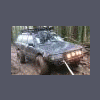
May 13, 200916 yr is it just me, or does the guard not look square with the car? Could just be camera angle, but the passenger side does look lower in the pictures... But who cares as long as it does its job... Plus I would like to see an off road subaru with everything straight and square
May 13, 200916 yr The side marker lights have been rewired as turn indicators How do you like this mod? I've been thinking of doing the same thing...
May 14, 200916 yr Author I think they're kind of hard to see during the day. But other than that, I like it.
May 14, 200916 yr Author Something else I would like to throw up here is my discovery of Hammerite. Its a paint that bonds to rust and then prevents said rusty item from becoming more rusty. I am going to apply liberal amounts to the rusty patches on my car. :banana:
May 18, 200916 yr Author It has been extensively, and has passed the "keep the headlights from being smashed in by a tree" test, the "able to go up steep inclines" test, and finally, the " pull the Toyota pickup out of a river" test. Not joking

Please sign in to comment
You will be able to leave a comment after signing in
Sign In Now