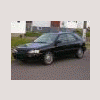
July 22, 200916 yr Hello folks.... I just bought a 96 impreza SW 2.2 auto. ac. auto door locks. 15"rims. black with gold color interior 217,000 kms , It had GOF. and trans flush ....To get more info I called the dealer and asked if the engine is free wheeling ,or if the timing belts breaks....He said they last 60.000 kms and not changed it will cost $$$$$ Also I like to know if any one has retro fitted H4 silverstars into the 9003 sockets ? And how that worked.. Looking for lots of help on this car so thanks in advance for the help..
July 23, 200916 yr Welcome aboard, imprezaII. Well, you've already learned a lot--like don't trust that dealer you called for information! '96 was the last year the EJ22 engine was still non-interference, which is what I assume you mean by "free wheeling." If the timing belt breaks it should not cause internal engine damage. Relieved?!!
July 23, 200916 yr Author Yes Very... I talked to my neighbour about the dealer. He said ,they say that to cover their backside in case the engine was replaced with a newer one and the valves go bendy.... Thanks for the info, and the welcome
July 23, 200916 yr Author Yes Very... I talked to my neighbour about the dealer. He said ,they say that to cover their backside in case the engine was replaced with a newer one and the valves go bendy.... Thanks for the info, and the welcome:)
Please sign in to comment
You will be able to leave a comment after signing in
Sign In Now