
Skip to content
View in the app

A better way to browse. Learn more.

Ultimate Subaru Message Board

A full-screen app on your home screen with push notifications, badges and more.

To install this app on iOS and iPadOS
  1. Tap the Share icon in Safari
  2. Scroll the menu and tap Add to Home Screen.
  3. Tap Add in the top-right corner.
To install this app on Android
  1. Tap the 3-dot menu (⋮) in the top-right corner of the browser.
  2. Tap Add to Home screen or Install app.
  3. Confirm by tapping Install.

Leaderboard

Popular Content

Showing content with the highest reputation on 07/22/21 in Posts

  1. 1 point
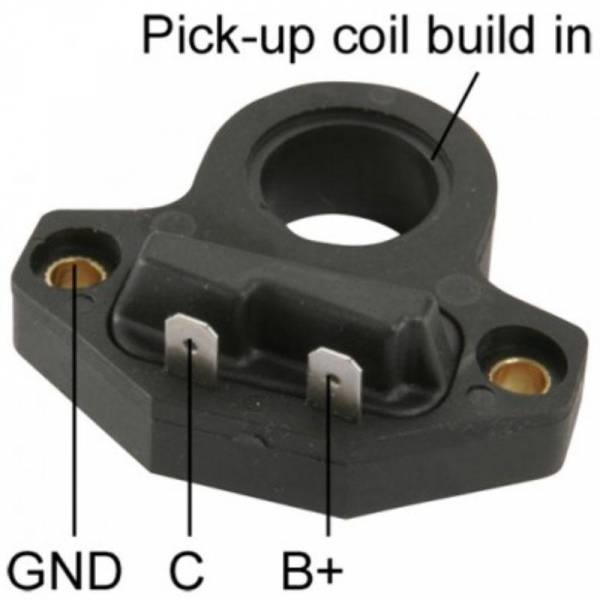
    Those don't have points. I have one and it has a Hitachi disty. Maybe it's the Ignition Control Module in the distributor getting hot and breaking down. Standard Part # LX515
  2. I think it's with the introduction of CANBUS which is like 2005 in the US market. So it would be 2004 and earlier are no big deal to swap diff ratios. After that I'm unsure what happens, but that's when the potential to run into more issues starts to present.
  3. everything is here: http://waybackmachine.org/20080801000000*/http://www.endwrench.com alot of it anyway -Rich
  4. Code came back. $1500 from a Trans shop! Ouch.

Account

Navigation

Search

Search

Configure browser push notifications

Chrome (Android)
  1. Tap the lock icon next to the address bar.
  2. Tap Permissions → Notifications.
  3. Adjust your preference.
Chrome (Desktop)
  1. Click the padlock icon in the address bar.
  2. Select Site settings.
  3. Find Notifications and adjust your preference.