Skip to content
View in the app

A better way to browse. Learn more.

Ultimate Subaru Message Board

A full-screen app on your home screen with push notifications, badges and more.

To install this app on iOS and iPadOS
  1. Tap the Share icon in Safari
  2. Scroll the menu and tap Add to Home Screen.
  3. Tap Add in the top-right corner.
To install this app on Android
  1. Tap the 3-dot menu (⋮) in the top-right corner of the browser.
  2. Tap Add to Home screen or Install app.
  3. Confirm by tapping Install.

dixracing

Members
  • Joined

  • Last visited

Everything posted by dixracing

  1. dixracing replied to dixracing's topic in Off Road
    http://www.ultimatesubaru.org/photos/showgallery.php?cat=500&ppuser=20814 here are some pix........
  2. dixracing replied to dixracing's topic in Off Road
    13,000 plus posts....holy moly dude ....you live here?
  3. dixracing replied to dixracing's topic in Off Road
    that may be ........well guess i'll have to earn it....
  4. dixracing replied to dixracing's topic in Off Road
    it says "may not post attachment"...... my bad on the year......
  5. dixracing replied to dixracing's topic in Off Road
    i have the subie up at my shop by the airport........gave her the tough test last week.......not bad ....thinking of welding up the rear end. i'll try photo bucket...when i get a chance.
  6. dixracing posted a topic in Off Road
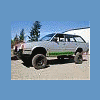
    i see no pix can be posted .......well check out my avatar.....lifted 8"
Account

Navigation

Search

Search

Configure browser push notifications

Chrome (Android)
  1. Tap the lock icon next to the address bar.
  2. Tap Permissions → Notifications.
  3. Adjust your preference.
Chrome (Desktop)
  1. Click the padlock icon in the address bar.
  2. Select Site settings.
  3. Find Notifications and adjust your preference.