Skip to content
View in the app

A better way to browse. Learn more.

Ultimate Subaru Message Board

A full-screen app on your home screen with push notifications, badges and more.

To install this app on iOS and iPadOS
  1. Tap the Share icon in Safari
  2. Scroll the menu and tap Add to Home Screen.
  3. Tap Add in the top-right corner.
To install this app on Android
  1. Tap the 3-dot menu (⋮) in the top-right corner of the browser.
  2. Tap Add to Home screen or Install app.
  3. Confirm by tapping Install.

Carl B.

Members
  • Joined

  • Last visited

Everything posted by Carl B.

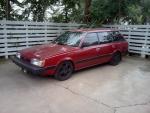
  1. well its a red, 5sp with the push button 4wd. It has 251,xxx miles but was very well maintained so its in great shape. The motor is a little tired, has some lifter tick. Reman lifters and oil pump and I think it will be good to go. Other than that I plan on going over it and cleaning everything meticulously and maybe a 5 lug conversion and some nice wheels. Thats "cool" to me.
  2. Picked up my 1st Subaru this week, a '91 Loyale, and I love this car. I'll be in the forums trying to learn how to make this car even cooler.
Account

Navigation

Search

Search

Configure browser push notifications

Chrome (Android)
  1. Tap the lock icon next to the address bar.
  2. Tap Permissions → Notifications.
  3. Adjust your preference.
Chrome (Desktop)
  1. Click the padlock icon in the address bar.
  2. Select Site settings.
  3. Find Notifications and adjust your preference.