Timoha
Members
-
Joined
-
Last visited
Everything posted by Timoha
-
-
-
http://imgsrc.ru/timoha-izh/37202036.html#bp 213902 Fischer
-
fantastic! is achieved as a result?
-
Привет Саш! как я понял просишь помощи в запчастях?
-
-
Thanks for the size, the time I have, I'll wait. where you found hub from xt6? how much do they cost? can you send Russia to me
-
NICO help http://www.ultimatesubaru.org/forum/topic/126559-retro-gl-10-turbo-build/page-10#entry1134007
-
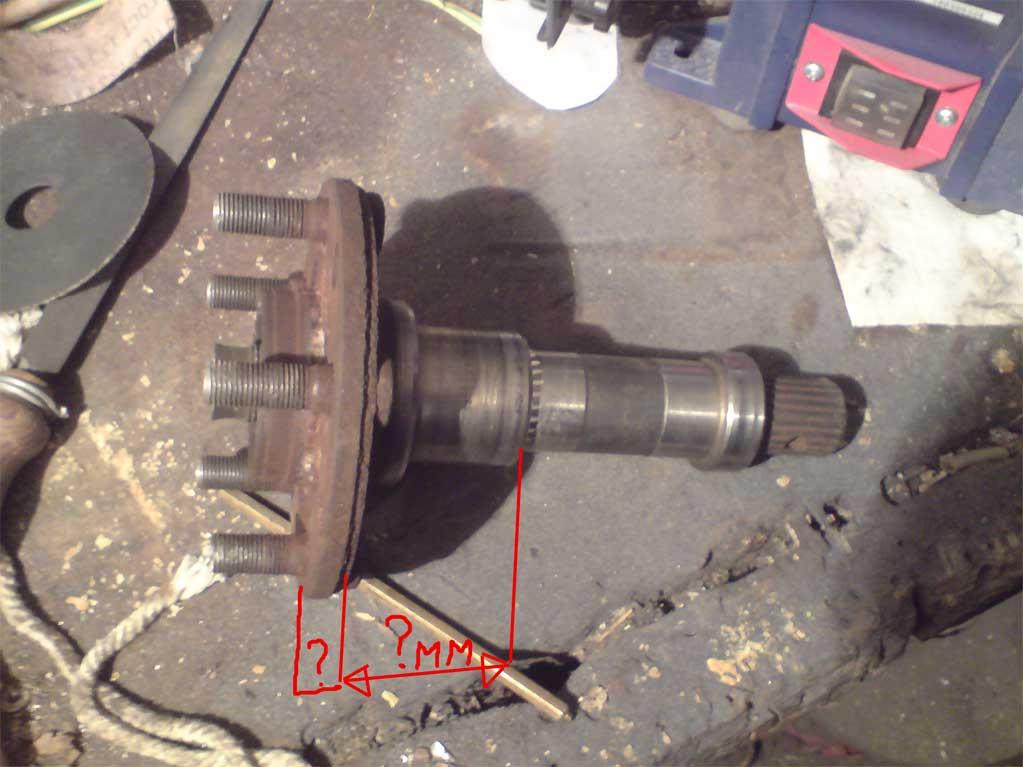
To you thanks! and Hello from Russia from all owners of Subaru leone! It not the UFO is a chandelier so at us in Russia call, salon illumination green and usual lamps at an open door or forcibly and there still is the fan, it has two modes weak and strong, it probably is more similar to the filter p.s. by the way on other disks looks smartly p.s2. other translator found, he more best than Google much more think p.s3. also can you can help to take the measurements of a back nave of xt6?
-
Track this topic from the beginning, just an incredible job! keep it up! take issue with the language translator from Google :) and yet here's my album http://imgsrc.ru/timoha-izh/a557142.html? from date of purchase, and almost to the present day (probably half a year already unbootable photo) and from the factory, I stood very same window visor but chrome and finally have authorized account