nick1208
Members
-
Joined
-
Last visited
Everything posted by nick1208
-
-
-
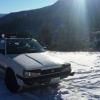
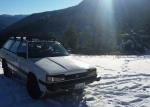
Hello, My name is Nick and I am the proud owner of a 1994 Subaru Loyale wagon. I'm relatively new to the older Subaru scene. I've owned this car for about 3 months now and I'm loving it. It is a 1.8L with a single range 4WD transmission. ~175k miles and running strong. Not much done to it other than: Roof rack (roof basket coming soon), plasti-dip racing stripe, painted steelies, and a kick rump roast sub in the back. Plans for Tint and a 2 inch lift in the future. Just saying hello (:
-
It is a 1.8L and has the single range 4wd transmission.
-
Awesome! I'll shoot you a PM. A friend and I are looking for some offroad terrain anywhere local. good looks at Tacoma from the picture!
-
They helped with the cost! It was $600 (which is a steal in its own) from my dads co-workers parents. I ended up paying around $200 out of pocket for it.
-
This is my 1994 Subaru Loyale wagon. (: Just got it for christmas I'm a 17 year old kid, Don't really know too much about it but i love Subaru's! Would be interested to hear what anyone has to say about it!