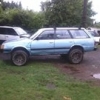
August 30, 201015 yr im looking at a 93 imp wag. the guy said it sat for awhile, he replaced the fuel pump after it sat and he says it ran great for weeks. he said it started not firing under load. im thinking timing since this happened to my ea82 and i reset the timing and its purring now. im aware that old/dirty gas could be a problem. MAC and idler sensor replaced. im trying to go look at it this week and itll be my first "new" sube. so whats the deal folks? ***ok, so im going to look at it tonight. what would make the motor puke and die under load? fuel filter? more sensor fun? he said it hasnt had timing belts changed since he bought it 10 years ago. please respond so i can swoop a good deal(hopefully)**** RV Edited August 30, 201015 yr by Subruise question got more specific
August 30, 201015 yr First year of the Impreza. Not interference! EJ18 (1.8L) engine and, from what I've heard, just as rugged and dependable as the EJ22. Should be easy to work on. Good luck.
August 30, 201015 yr Author ok read the update, what could be causing this problem?????(what tools to take w/me?
August 30, 201015 yr a fuel filter would be a good thing to do cheap plug wires have caused under load problems on a few subarus i have had. start with a good tune up. there really isnt much to go wrong.

Please sign in to comment
You will be able to leave a comment after signing in
Sign In Now