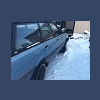
December 6, 201114 yr i just added a new subaru to the family 91 spfi 4x4 pushbutton wagon. how ever the previous owner drove it for a long time with the axle nut only half screwed on. meth heads..... anywho. yeah nice wagon for $300... and i got parts everywhere...muahahahahaha.. i had to gloat.. should be a perfect daily driver or quick profit...might make a habbit out of this.. if i did would anyone be interested in some parts?.. we got alot of them here its the shipping from AK that will be pricey.. will get pics soon. prolly a vid tho
December 6, 201114 yr so what did you do, put it in 4wd and drive it home? i once got an 88 dl for $150 over a stripped hub. it sat for 2 years, but i got it to start, put it in 4wd, and drive it over to my tow vehicle to transport it. Good score
December 6, 201114 yr Author i woulda but the wheel was locked up and with just an open rear diff, it wasnt going anywhere. so i payed a flatbed to get it to my driveway.. the timing is a little off.. or it needs a serious tune up lol gutless. and revs up slowly ill get a vid of it tomorrow too dark now.
December 6, 201114 yr Author this one sat since like may this year, so it started up quick everything aside from the hub is good tho. p/w p/l p/m etc etc.. a lil rust but nothing structural.

Please sign in to comment
You will be able to leave a comment after signing in
Sign In Now