March 7, 201214 yr i have an 82 brat in harvest gold(?) i have three center caps one is red, two are blue. which color is the correct color?
March 7, 201214 yr and lookin california, oh yeah. had to sorry. not sure if the center caps had a specificity (is that a word?) to them or not. id say if the interior is blue go with blue or something like that. im sure someone will prove me incorrect tho
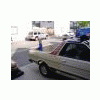
March 7, 201214 yr Author Thanks subruise! can never get enough soundgarden:headbang: i take it i need to put my pics on a host site first (ie. photobucket). there you go. Edited March 7, 201214 yr by feelinminnesota
March 7, 201214 yr Thanks subruise! can never get enough soundgarden:headbang:i take it i need to put my pics on a host site first (ie. photobucket). Yupp photobucket is best... use the IMG code.
March 7, 201214 yr Ah, then I have seen (and have) a red one, although mine is faded to more of a brown. As far as a useful answer to your question, I got nothin'.
March 7, 201214 yr My 1980 has all brown caps. Does that mean they were really red though? I thought they were a brown from the factory? I also thought blue ones were 1981 and up?
March 8, 201214 yr Author so is the color year specific or car color specific? i think the blues look good, so perhaps i'll just get two more blue ones. thanks for all the replies guys.
March 8, 201214 yr You could polish up the chrome and put any sticker you want... Stubies_Subie was looking for Subaru stickers that he could put in his, but he also found other ones... eBay is a great place... but Id also ask Stubies_Subie about those extra stickers.

Please sign in to comment
You will be able to leave a comment after signing in
Sign In Now