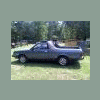
May 17, 201213 yr Does anyone Know The Color Codes To Wire A Coil On 85 brat?Or Pictures Of One Wired.Cannot Get Spark ,Have New Coil , New Distributor,New Plug Wires And Plugs. Did Run For A Few Minutes Then Quit. Cannot Restart. Fuel Pump Is Working Properly. Have Power On Coil Both Pos And Neg When Key Is On.Getting Frustrated...Help!!!!
May 17, 201213 yr Blacks to positive. Yellows and a gray to negative. Tach move while cranking? Test light on coil negative flash while cranking? Stock coil?
May 18, 201213 yr Author Stock Replacement coil Tach Does not Move While Cranking Test Light Does not Flash While Cranking No Grey Wire
May 18, 201213 yr Ignition module in the new distributor is fried. Take it back and demand another.Be indignant. Check the charging voltage imediately after start up w/the new disty in case it is excessive. Consider bench testing the alternator first. Edited May 18, 201213 yr by naru
May 20, 201213 yr don't have one to look at but from memory yellow and gray are on - and blacks + the two from the dist. have to be on opposites. with all wires off and key on, the +lead goes on + post then add 2 from dist. and try. good luck.
May 20, 201213 yr The 2 wires from the disty go to opposing sides of the coil. Black to Pos+ and the other to Neg- Then, all you should need from the body harness is the B/w wire to Pos+ post. Yellow wire goes to Neg- side, that is just Tach signal wire....not needed to fire coil, but without it...the Fuel pump relay will not power the pump. Edited May 20, 201213 yr by Gloyale
May 30, 201213 yr Author Thanks Everyone, Got Her Running, Now Having Some Cooling Issues. Working My Way Down The List.

Please sign in to comment
You will be able to leave a comment after signing in
Sign In Now