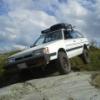
October 8, 201312 yr The passenger side rear wheel on my 4" lifted loyale is tilted out at the top. Noticeably more than the drivers side. I know there is very little adjustment back there but what would cause this? What would fix it?
October 8, 201312 yr The passenger side rear wheel on my 4" lifted loyale is tilted out at the top. Noticeably more than the drivers side. I know there is very little adjustment back there but what would cause this? What would fix it? How are the bushings at the front of the trailing arm and and control arm where they bolt to the cross tube? I had the same problem on mine, and it turned out those bushings were completely dicked. After fixing that my camber was back on target. Also, at least on my car, there's a surprising amount of adjustment in those 3 annoying bolts on the trailing arm thingy. Anyone know the subaru part number on the block of wood in step 5? LOL Edited October 8, 201312 yr by 987687
October 8, 201312 yr Author Thanks for the diagram Chris. The bushings are all in good shape. I'll have to see if I can improve it with those bolts.
October 10, 201312 yr Thanks for the diagram Chris. The bushings are all in good shape. I'll have to see if I can improve it with those bolts. Please let me know how that goes!

Please sign in to comment
You will be able to leave a comment after signing in
Sign In Now