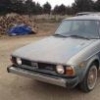
December 29, 201312 yr I currently have a '79 wagon which I'm in love with, but this popped up on a recent craigslist search... http://joplin.craigslist.org/cto/4257094871.html It's about 3 hours away from me, and a reasonable price for sure. Would be nice to have a hatchback to drive around while I work on the wagon.... It does have 139k on it. Not sure about rust issues, or other issues. I know that most ea71s are pretty tired by that point... Even if I don't end up with it, someone here should snap it up!
December 29, 201312 yr Looks like a decent deal to me. I would partake in getting it, except that is not what I need, another project...to little time...
December 29, 201312 yr That headlight setup looks interesting, for sure! Not much rust at all by the looks of it, but who knows what the underside holds (or doesnt)
December 30, 201312 yr Thats my car! I was supposed to sell it today but it she didnt want to leave. i still have her. Oh and there is no rust anywhere except some surface rust here and there. those lights arent hooked up, just mounted to the bumper.

Please sign in to comment
You will be able to leave a comment after signing in
Sign In Now