May 27, 201510 yr I have never done this myself and am only considering it for my current subie (prefer not to) but plan to eventually get another subie that I will be more rough with and hit some real offroad trails like I used to do with my Toyota 4Runners. Pictures are good and plenty but maybe a thread on tools and techniques would be interesting here (does it already exist?) too? Videos would be great (I have seen some on Youtube for Jeeps mainly).
May 27, 201510 yr on my cars Ive trimmed back leaving about 1/2" extra , then bent that under so theres a smooth edge, when and if your tire rums you don't want a sharp edge or you will cut/groove your tires , ive used pliers and a hammer and a dolly to bend
May 27, 201510 yr Heres mine. Ive posted these before, but whatever. I cut 1.5" from the rear, and 3" from the front using just a sawzall. Measured carefully and drew it out so it would still look somewhat normal, and not like somebody took a sawzall to it. The rear has several layers, so i riveted them back together after the cut. These pics are with 195-75-14 BFGs. Its now sitting on 205-75-14s, and i had to massage with a BFG, the reinforcement rib that runs through the front fenderwell to fit those. And no lift!
May 27, 201510 yr I cut the flared section out of an early 90's Chevy Cavalier and welded them on. I had cut the fenders before, but it didn't cover the tire and the cut fender was really easy to bend in.

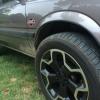
Please sign in to comment
You will be able to leave a comment after signing in
Sign In Now