Skip to content
View in the app

A better way to browse. Learn more.

Ultimate Subaru Message Board

A full-screen app on your home screen with push notifications, badges and more.

To install this app on iOS and iPadOS
  1. Tap the Share icon in Safari
  2. Scroll the menu and tap Add to Home Screen.
  3. Tap Add in the top-right corner.
To install this app on Android
  1. Tap the 3-dot menu (⋮) in the top-right corner of the browser.
  2. Tap Add to Home screen or Install app.
  3. Confirm by tapping Install.

Your chance to help design a car - ComatoseLlama's derby project

Featured Replies

So, I just got my derby car. 92 matte black legacy, fwd ej22. Ej22 will go into my impreza, and ej18 into the legacy, because why not That is after I get it running.


But now to the title, I need design ideas. The number will be 555. But the paint scheme is where I have debate. My ideas were


1: Keep it

2: WRC colors

3: A tribute to the bumblebeasts, radioactive yellow with the black stripe, as a shoutout to all the help JeZek has given so many of us

4. Fighter jet open mouth with olive drab green

DSC01356.jpg


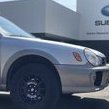
This is the car, got it for $200, couldn't not get it. Pic in the p/o driveway. Kid wasn't happy when he found out what I'm using it for, lol

0707151922_zpslhovatrk.jpg


Help me design it!

Please sign in to comment

You will be able to leave a comment after signing in

Sign In Now

Account

Navigation

Search

Search

Configure browser push notifications

Chrome (Android)
  1. Tap the lock icon next to the address bar.
  2. Tap Permissions → Notifications.
  3. Adjust your preference.
Chrome (Desktop)
  1. Click the padlock icon in the address bar.
  2. Select Site settings.
  3. Find Notifications and adjust your preference.