Skip to content
View in the app

A better way to browse. Learn more.

Ultimate Subaru Message Board

A full-screen app on your home screen with push notifications, badges and more.

To install this app on iOS and iPadOS
  1. Tap the Share icon in Safari
  2. Scroll the menu and tap Add to Home Screen.
  3. Tap Add in the top-right corner.
To install this app on Android
  1. Tap the 3-dot menu (⋮) in the top-right corner of the browser.
  2. Tap Add to Home screen or Install app.
  3. Confirm by tapping Install.

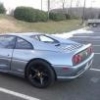
I replaced the Impreza RS turbo with an STI
Featured Replies

Sweet!


Have any BIGGER pictures? :)

Yeah no kidding! Some of us dinosaurs are still on 56k here ;)

  • Author
What I want to know is how is the brat on the highway? Can it get a pretty good top speed? Whats are the gear ratios? I had an 88 Toyota pick-up with the stock 4 banger, 21 inches of lift and 44's but I was also running 4.56 gears. Wasn't the fastest off the line but it could do 50-60 with little trouble.


So what, you have assigned yourself as my personal ball buster? I stand by my original statement to you. The BRAT has a 250Hp H6 and proper gearing. I can accelerate faster from 60Mph than your wagon can from a stoplight.

Ok, now subaurbrat needs a cool down lap or 3.

No really, I am getting tired of this guy riding me.


I don't think he's riding you, I think he's just curious. He went as far as to qualify his curiousity by telling you what type of vehicle he owned that he was mentlaly comparing it to. Granted it's off topic for the thread, but still doens't require this hostility you've shown towards him.


In all seriousness, I met you at carlisle, but didn't exactly get to know you. I hope you don't act like this behind the wheel of the STi. :(


Keith

  • Author

I asked the mods to close this thread, this is going nowhere.

Guest
This topic is now closed to further replies.

Account

Navigation

Search

Search

Configure browser push notifications

Chrome (Android)
  1. Tap the lock icon next to the address bar.
  2. Tap Permissions → Notifications.
  3. Adjust your preference.
Chrome (Desktop)
  1. Click the padlock icon in the address bar.
  2. Select Site settings.
  3. Find Notifications and adjust your preference.
