March 1, 200719 yr I had a blast, as usual. I was only there sunday...I was really hoping they were going to run Crain Creek in the snow on saturday but that didn't happen. Looks like I missed out on Tahola!
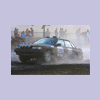
January 21, 200818 yr Author i hate dragging old posts out of the garbage but i thought it was funny when i first posted this i would have never thought that later on that year I would have bought that legacy that crashed. and with much $$$ it's now it's a whole new beast.
January 25, 200818 yr Can't believe I found a fool stoopid enough to buy that pos legacy lol. J/K had too!!! Can't wait to see ya out there with my new rally car muhahaha. Shooting for Oregon trail rally 08. And it wasn't that much money haha.
January 25, 200818 yr Author And it wasn't that much money haha. not what i paid for it, its what i put into it to make it bigger, badder and faster

Please sign in to comment
You will be able to leave a comment after signing in
Sign In Now