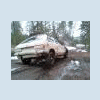
July 20, 200817 yr Lookey what I found while cleaning out my room...found this on an older Idaho Drivers Manual
July 21, 200817 yr lol there was apicture of a national park in one of my highschool classes, and you could see part of a maroon Loyale in the parking lot
July 21, 200817 yr lol there was apicture of a national park in one of my highschool classes, and you could see part of a maroon Loyale in the parking lot Yea you can point out the suby but what are the other to cars. I know do you:grin:
July 21, 200817 yr Yea you can point out the suby but what are the other to cars. I know do you:grin: Ford Tempo and Chevy S10, ya?
July 21, 200817 yr Ford Tempo and Chevy S10, ya? Booya although im alittle skeptical of the s10 kinda looks like one of those early dodge dakotas too doesnt it. Ben
July 21, 200817 yr I dunno, since there doesnt appear to be turn signals in the bumper, Im startin to think Ford Ranger...
July 21, 200817 yr The Same Plattform Used on the Chevy S10, came as GMC... ¿? ...I Don`t Remember the Model`s Name, but it can Be. The Important here is the Subie: Nice Found! Thanx for Sharing!
July 21, 200817 yr The Same Plattform Used on the Chevy S10, came as GMC... ¿? ...I Don`t Remember the Model`s Name, but it can Be. The Important here is the Subie: Nice Found! Thanx for Sharing! GMC Sonoma, or S-15. Both just re badged S-10, but the S-15 is SUPPOSEDLY heavier duty. Personally, they are all built just like a rock, they sit there and do nothing.
July 21, 200817 yr GMC Sonoma, or S-15. Both just re badged S-10, but the S-15 is SUPPOSEDLY heavier duty. Personally, they are all built just like a rock, they sit there and do nothing. Ha, Ha, Ha!!! Built Like a Rock! ... `cos They do Nothing... LOL! ... ... Nice Comment! Yes, GMC "Sonoma" is what I did Have in my Mind... Thanx!

Please sign in to comment
You will be able to leave a comment after signing in
Sign In Now