July 25, 200817 yr ok so from the outside it doesn't look like anything more then a normal tranny and rearend. it's what on the inside that counts. the NA tranny is a 01 forester with a set of 4.44s gears swapped in and the rear end is a 98 auto outback which came with 4.44s but i swapped in a clutch lsd from the older turbo GLs. all this is going in my legacy rally car, should make for a fun car.
July 30, 200817 yr Author if i didn't mess up rebuilding the rear end it would be in already, i have no idea what i did but that thing was crazy tight and never loosened up. i had to start over with a new rear diff. but lesson learned, for what i can rebuild one for i can get another one for about the same price.
July 30, 200817 yr I'm a little jealous, but settle for the 4.111 set up I just dropped into my coupe. This time next year, that 4.111 should be a dual range awd ej.
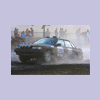
July 31, 200817 yr Author Nice plan! Let us see the final result....so I can go completely green with envy funny you should say green couple of pics from the oregon trail rally

Please sign in to comment
You will be able to leave a comment after signing in
Sign In Now