Leaderboard
-
DaveAP
Members1Points300Posts -
El Presidente
Members1Points622Posts -
montana tom
Members1Points814Posts -
FerGloyale
Members1Points720Posts



Popular Content
Showing content with the highest reputation on 04/14/19 in Posts
-
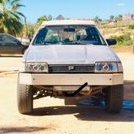
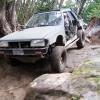
1 pointLong time lurker. I’ve been building out my ea82 Gl for a a while and I thought I should start a build thread. here it is in Baja Mexico! so here the build so far: -4inch body lift(6inch currently) -ej25dohc -poptop -crustom ifs (I bent one of the original lca) -modded rear seats so the sit flat -projector bulb retrofit/angle eyes -custom aluminium bumper Currently in the middle of building a vlsd rear diff. which requires completely dismantling the vlsd and ea82 diffs, to the point of pressing out the threaded inserts in the spider gears.1 point
-
1 point
-
1 pointThe gasket's, are a pair of Subaru # 11044AA114 The other is the ebay item number that you would search for on ebay. # 141665882014 That particular seller is where I buy all my subi head gaskets .1 point
-
1 pointRespect your knowledge, but I think you got it backwards. 95 was Dual port 2.2 WITH EGR. It was the MT that did not. 95 AT 2.2 is actually the perfect swap for the DOHC 2.5 since it has Dual port exhaust. I know because that's alway what I ask for when I buy 2.2 for OB and FOR swaps. 96-98 2.2 in AT Legacy/Outback(96 only) cars also had EGR, but are Single port exhaust so not a "Direct" swap unless you swap ex.manifolds. It was the 90-94 and the MT 95-98 2.2 that did not have EGR1 point
-
1 pointYes Uberoo, it was a sign: Use the rug as an adapter plate. Josh1 point