Skip to content
View in the app

A better way to browse. Learn more.

Ultimate Subaru Message Board

A full-screen app on your home screen with push notifications, badges and more.

To install this app on iOS and iPadOS
  1. Tap the Share icon in Safari
  2. Scroll the menu and tap Add to Home Screen.
  3. Tap Add in the top-right corner.
To install this app on Android
  1. Tap the 3-dot menu (⋮) in the top-right corner of the browser.
  2. Tap Add to Home screen or Install app.
  3. Confirm by tapping Install.

Leaderboard

Popular Content

Showing content with the highest reputation on 10/17/23 in all areas

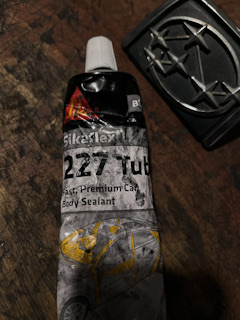
  1. Howdy Bennie,Your ozzie sun is likely crueler on the rubber than here,my side windows were decent. My donor was likely closer to what yours is like ,as tried to remove tailgate seal on that one also,but was too far gone and ended up ripping it,as too brittle. Possibly worth leaving insitu,and try this stuff,I used it to reseal where I had sliced the seal in a couple of spots,can’t even tell. It does say you can sand it to shape when set,so may be worth a go,cheers Westy
  2. Awesome job! No wonder your daughter wants to claim it in 6 years.

Account

Navigation

Search

Search

Configure browser push notifications

Chrome (Android)
  1. Tap the lock icon next to the address bar.
  2. Tap Permissions → Notifications.
  3. Adjust your preference.
Chrome (Desktop)
  1. Click the padlock icon in the address bar.
  2. Select Site settings.
  3. Find Notifications and adjust your preference.