
Leaderboard
-
pontoontodd
Members1Points2618Posts
Popular Content
Showing content with the highest reputation on 11/03/24 in all areas
-
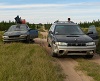
Rear bumper fabrication conclusion. Added some slider tubes to protect charcoal canister, hang muffler, and provide some kind of ramp when backing over obstacles. Added tabs for license plate and license plate lights. Added lateral receivers for jacking and winching. Ready for paint. Might get the old rusty front bumper on the white Outback painted at the same time. Should protect the body from trees and make recoveries easier. Slammo had suggested the thermostat in the EZ36 in the Impreza might be bad. I drained the coolant, cleaned the radiator (seemed pretty clean inside and out, don't think that was contributing to the problem), and removed the old thermostat. It looked fairly clean but is most likely 11+ years old and sat for a year or two dry. Tested it side by side with a new one from the dealer by bringing a pot of water up to boiling. New one (bottom) definitely opened sooner than the old one. But after a few minutes they both opened the same amount. While slowly cooling down they looked the same. Did that twice, same results. So hopefully the new one will help stabilize engine coolant temps. Still might add inlet and outlet temp sensors that have a calibration for the Haltech.1 point