RBGERSON
Members
-
Joined
-
Last visited
-
RBGERSON replied to RBGERSON's topic in 1990 to Present Legacy, Impreza, Outback, Forester, Baja, WRX&WrxSTI, SVXStill good
-
RBGERSON replied to RBGERSON's topic in 1990 to Present Legacy, Impreza, Outback, Forester, Baja, WRX&WrxSTI, SVXFlush done things better
-
RBGERSON replied to RBGERSON's topic in 1990 to Present Legacy, Impreza, Outback, Forester, Baja, WRX&WrxSTI, SVXThe car in great shape..it's a limited edition, all leather, upgraded sound system,, nothing more than parking lot dings, no sun faded paint..garage kept it's entire life, low miles 78,000, newer tires and brake pads etc.,air filter every 20,000, oil changed every 3,000 to 4,000 miles; j
-
RBGERSON replied to RBGERSON's topic in 1990 to Present Legacy, Impreza, Outback, Forester, Baja, WRX&WrxSTI, SVXBut at 150,000 or so..
-
RBGERSON replied to RBGERSON's topic in 1990 to Present Legacy, Impreza, Outback, Forester, Baja, WRX&WrxSTI, SVXAt this point I am waiting to hear back from Subaru not expecting much from them but one never knows. i will try removing the thermostat, using a flush and then a HD gasket repair fluid..with a money back guarantee i can't go too far wrong. Lets hope Subaru steps up and does the repair.. In the letter they did say they'd cover the cost of a head gasket repair if you had it done on youir own???
-
RBGERSON replied to RBGERSON's topic in 1990 to Present Legacy, Impreza, Outback, Forester, Baja, WRX&WrxSTI, SVXTalked to subaru
-
RBGERSON replied to RBGERSON's topic in 1990 to Present Legacy, Impreza, Outback, Forester, Baja, WRX&WrxSTI, SVXNo recall on this model or engine
-
RBGERSON replied to RBGERSON's topic in 1990 to Present Legacy, Impreza, Outback, Forester, Baja, WRX&WrxSTI, SVXAutozone has the right tester
-
RBGERSON replied to RBGERSON's topic in 1990 to Present Legacy, Impreza, Outback, Forester, Baja, WRX&WrxSTI, SVXOK wil try
-
RBGERSON replied to RBGERSON's topic in 1990 to Present Legacy, Impreza, Outback, Forester, Baja, WRX&WrxSTI, SVXAlso in doing research couldn't this be just a bad radiator cap..not holding pressure so and letting water out into the reservoir which over flows on the ground; so loosing fluid until the car over heats??? New cap..
-
RBGERSON replied to RBGERSON's topic in 1990 to Present Legacy, Impreza, Outback, Forester, Baja, WRX&WrxSTI, SVXfound the manual link..THANKS!!
-
RBGERSON replied to RBGERSON's topic in 1990 to Present Legacy, Impreza, Outback, Forester, Baja, WRX&WrxSTI, SVXDoing a flush..and change fluids
-
-
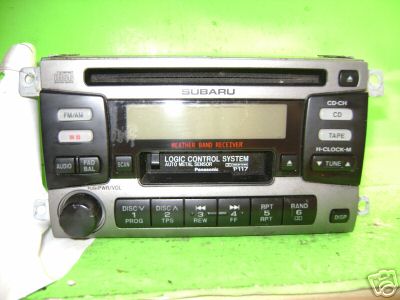
RBGERSON replied to RBGERSON's topic in 1990 to Present Legacy, Impreza, Outback, Forester, Baja, WRX&WrxSTI, SVXThis is what i have will yours swap out with no wiring issues, is it the same unit? PS right now there is one on Ebay for $20
-
I tried cleaning the Cd player with one of those cleaning disks no luck. The player takes in a CD, spins it around for a couple of seconds and then spits it back out. Any ideas what's wrong? AND!!! is there a source for buying a replacement single CD player that fits in the 1999 Outback Limited besides a Subaru dealer?