June 26, 201015 yr Camped out and did some wheelin and dirt bike ridin at tahuya. First time out with my new engine and I'm lovin it! Here's some vids. http://s444.photobucket.com/albums/qq170/jbbvw/Tahuya%206-6-10/?action=view¤t=Tahuya6-6-2010164.mp4 http://s444.photobucket.com/albums/qq170/jbbvw/Tahuya%206-6-10/?action=view¤t=Tahuya6-6-2010165.mp4 http://s444.photobucket.com/albums/qq170/jbbvw/Tahuya%206-6-10/?action=view¤t=Tahuya6-6-2010168.mp4 http://s444.photobucket.com/albums/qq170/jbbvw/Tahuya%206-6-10/?action=view¤t=Tahuya6-6-2010169.mp4
June 27, 201015 yr That looks pretty awesome. I need to hit up Tahuya sometime in the near future. What's that van in the background? 4wd toyota van?
June 28, 201015 yr Author That looks pretty awesome. I need to hit up Tahuya sometime in the near future. What's that van in the background? 4wd toyota van? Yeah, I was wheelin with two of my brothers, ones got the yota van and the other has a scout. and I'm planning and hoping to make it to Walker
June 28, 201015 yr That scout looks pretty sweet. Where the footage of the van?! I've never seen anyone wheeling a van before, seems like it would be too long for a lot of trails.
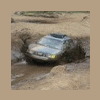
June 28, 201015 yr Pretty sweet, its almost more of a boat than a subaru!!! Hope to see you up at Walker!!!!!!!!!!!!!!!!!!!!!!!!!!!!!!!!!!!!!!!!!!!! Jeff
July 1, 201015 yr Author Yeah I went through the first water hole where that picture is, but I didn't feel like going swimming like the guy that had his bronco stuck in the second one so I decided not to try that one.

Please sign in to comment
You will be able to leave a comment after signing in
Sign In Now