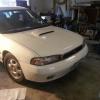
December 19, 201213 yr my search function isn't working and there is a 1996 legacy I'm looking at with trans problems. he had AutoZone scan it and got that code. explains something about the torque converter
December 19, 201213 yr What other symptoms besides the code? Is the bottom of the transmission pan dented or pushed up? (Like some put a jack under it)
December 19, 201213 yr my search function isn't working and there is a 1996 legacy I'm looking at with trans problems. he had AutoZone scan it and got that code. explains something about the torque converter one link and HERE to get you started GL td
December 19, 201213 yr Author here's what he said. all I asked is what he physically noticed and asked in the trans temp light was on. Not that I noticed. I was driving home and it sounded like gears weren't being engaged when it was supposed to shift but once I got going it wasn't bad mostly first taking off. I did a diagnostic and code p0740 came up and that is torque clutch malfunction. and thanks for the links.
December 19, 201213 yr Had a similar issue on a 98 Forester. In my case the dipstick was bent just enough that it would touch the solenoid, grounding it and giving me the code. Just another possibility. O.

Please sign in to comment
You will be able to leave a comment after signing in
Sign In Now