January 23, 201412 yr Author here is a link to the page with the the exact snorkel that I bought http://www.ebay.com/itm/370973428193?ssPageName=STRK:MEWNX:IT&_trksid=p3984.m1497.l2649
January 23, 201412 yr here is a link to the page with the the exact snorkel that I bought http://www.ebay.com/itm/370973428193?ssPageName=STRK:MEWNX:IT&_trksid=p3984.m1497.l2649 In case the link disappears its for a 90-97 mitsubishi montero/pajero.
February 9, 201412 yr I swear ive seen this car drive past auburn municipal airport... maybe not, but then again it would he hard to miss. Nice rig
February 9, 201412 yr Author I swear ive seen this car drive past auburn municipal airport... maybe not, but then again it would he hard to miss. Nice rig My best friend of 16 years owns Outback Automotive, a Subaru specialty shop that's right across from the air port almost. So I'm in the area a lot.
March 4, 201412 yr So how is the 4EAT handling the power? Honestly I've always been afraid of Subarus 4EAT, plus I love to drive stick but being that you can't get a d/r with any of the EJ cars (unless you do the swap yourself), the auto is the way to go for off roading.
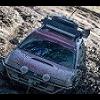
March 4, 201412 yr Author So how is the 4EAT handling the power? Honestly I've always been afraid of Subarus 4EAT, plus I love to drive stick but being that you can't get a d/r with any of the EJ cars (unless you do the swap yourself), the auto is the way to go for off roading. The 4eat seams to be doing just fine, I have a big B&M trans cooler on it so I'm sure that helps. I have purposely not been nice to it, I would rather have it break on the street than on the trail. That being said I beat the hell out of the car at Tahuya and had vary little carnage the power train held up great.

Please sign in to comment
You will be able to leave a comment after signing in
Sign In Now