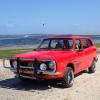
October 21, 201510 yr Hey everyone, I've been admiring the pics of 1st gen Subarus on this forum and now I've bought one I’d better join the club :-) Found this little beauty on The Gumtree (Aussie equivalent of Craig's List) and just couldn't resist- I've got an '06 Forester XT but have always had a soft spot for older Subies. Seeing this made me realise how long is't been since I've actually seen one on the road, they seem to be a dying breed so I wanna do my bit to preserve one. Needs a bit of work but someone has obviously cared for him in the past- new rubbers, home respray, reconditioned EA71, and pretty good interior for it's age. First mission is to get him Roadworthy, so I'm fixing up a few things ready for the inspection. There have been a few customisations along the way (home-made go-faster stripes, '80s Leone grille, blacked out tail light surrounds, plastic "SUBARU" badges on the side), but I'm aiming to get him back to a more original 70's vibe. Plastic out, chrome in :-)
October 22, 201510 yr Welcome. Your first gen Subaru Leone looks Awesome. It has Sunroof, EA71 engine, and 4WD! even the Dog is Happy with it Kind Regards.
November 1, 201510 yr Author Thanks JesZek, my dog Bacon and I are both thrilled with the new car! Just had it serviced and it's running beautifully- now even more fun to drive :-)
November 1, 201510 yr I hadn't noticed the dog when I first looked. That's perfect--such "pride of ownership!"

Please sign in to comment
You will be able to leave a comment after signing in
Sign In Now