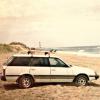
September 16, 20187 yr It appears that this car is not for sale, but in the personal collection of a dealer. This thing is so cool! Headlight washers, EA81t, cool wheels, and the floor mats are epic! http://www.duncanimports.com/used/Subaru/1983-Subaru-Leone-cbef23e20a0e08ba71bd5d5e892f836f.htm
September 16, 20187 yr That is awesome! A coworker has a RHD 93 Leone that he is considering selling to me. I'm not terribly fond of the body style. but hey, it's RHD! lol
September 17, 20187 yr That is really cool, but he doesn't have any center caps!!! Edited September 17, 20187 yr by carfreak85
September 17, 20187 yr 7 hours ago, carfreak85 said: That is really cool, but he doesn't have any center caps!!! ahahaha! good eye! missed it earlier.

Please sign in to comment
You will be able to leave a comment after signing in
Sign In Now