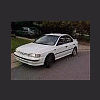
November 18, 200520 yr I got a 1993 subaru impreza (1.8l engine) the other day I took my car on a rocky gravel road and when I was done I notice a knocking noise comming from the engine I was thinking it was a rocker arm loose but after playin with it I notices it only makes a noise when the throttle is open wide its completely quiet if the throttle is closed no matter what the engine speed is at could it still be a rocker arm or something else?
November 19, 200520 yr Author yah that would make since cause the sound comes from the middle of the engine kinda im gonna record the sound with my phone today then bring it to the computer but I can only hear with when the throttle is open slightly
November 20, 200520 yr I have a 20K 1.8 Impreza engine available. I paid 450 would like the same. Complete with acc. I'm down in the springs. If you want to sell the car let me know. Larry
November 20, 200520 yr Author I have a 20K 1.8 Impreza engine available. I paid 450 would like the same. Complete with acc. I'm down in the springs. If you want to sell the car let me know. Larry actually I was interested in the 2.2 legacy engine you have
November 20, 200520 yr Yes, a 93 with 130K runs good. $450 or you can have the complete car for $700. Auto AWD Trans.

Please sign in to comment
You will be able to leave a comment after signing in
Sign In Now