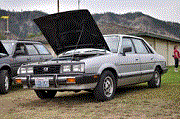
March 9, 200620 yr This belongs to a co-worker. He says it starts and idles but when the gas is applied the timing jumps and it dies. He said the timing belts were replaced ans well as the disty. What can cause this particular issue? I can't seem to get him on here he thinks we have to be suby freaks to go to a suby board for info and help.. I suppose that is part true.
March 11, 200620 yr see if he tigheted down the distu, if not it could jsut be moving around back there, see if the cam dosnt have worn teeth also so when the engine speeds up its not caughting the gears on the distu.
March 12, 200620 yr That would be SPFI then? So does he have the timing at 20 degrees initial advance? The timing should jump - the SPFI computer will give more advance off-idle. Just like a vacuum advance would do with ported vacuum. I say your problem is elsewhere - checked the fuel filter recently? Check the computer for codes, and get back to us. GD
March 12, 200620 yr There is a green pair of connectors near the brake master cylinder that gets plugged together when you do the timing @ 20 degrees. This is an electronic advance disconnect that is equivalent to pulling off/plugging a vacuum advance. Disconnect the green connectors after you have set the timing and tightened the 2 10mm distributor bolts.

Please sign in to comment
You will be able to leave a comment after signing in
Sign In Now