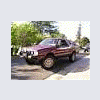
June 29, 200718 yr Hey all: I pulled the driving lights off my "soon to be sold" bmw 2002. They look better on the brat anywho! I found an 81 or 82 wagon at jy with factory fog lights. I snagged the switch and used it for these lights. It fit right in the plugged hole on my lower console (of course it did). God I love subarus. http://www.ultimatesubaru.org/photos/data/500/medium/Picture_0032.jpg
June 29, 200718 yr Yeah, Hella's rock.. Pitty I had to replace my old hellas with narvas, but free can't be over looked. Looks cool with that winch.
June 29, 200718 yr Author Let's see a pic of that 02! I could get a pic of it but its in pieces awaiting 5speed conversion and me to reseal all the leaks on the engine. The brat upgrading has taken priority.
June 29, 200718 yr Yeah unfortunately all these stupid Subarus have taken my attention away from my 2002 as well.

Please sign in to comment
You will be able to leave a comment after signing in
Sign In Now