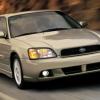
January 26, 200818 yr I have been driving by a 5-speed, Subaru Legacy 2.5GT for sale it has the same body style as my old '98 Legacy L wagon. What year range is this body style. '96 to '00 correct?
January 26, 200818 yr Hi. Pretty sure '99 would have been the last year for that gen. '00-'04 was a redesigned model year and looks a bit different. '05+ was another redesigned model year.
January 26, 200818 yr Author Hi. Pretty sure '99 would have been the last year for that gen. '00-'04 was a redesigned model year and looks a bit different. '05+ was another redesigned model year. Thanks porcupine! So it is a '96 through '99 5-speed, Legacy 2.5GT sedan. So it has the HG internal leak prone phase I EJ25, correct.
January 26, 200818 yr Author affirmative, sirLink to GT specs for 98 Too bad nice shape and REAL cheap!
January 26, 200818 yr If it's cheap enough and you like it then maybe check it out. Even if it has or gets the hg issue that is fixable with the right parts technique and $. Ok well $$$$.
January 27, 200818 yr 90,91 Legacy = first generation. Slightly angular nose and grill 92-94 Legacy = first gen revised, identical to 91,92 with a very mild restyle on the front end. Rounded front end and side marker lights added. My personal favorites:grin: 95-99 Legacy = second generation. Still mechanically almost identical. But fully restyled. Outback model and 2.5 introduced 2000-2004 Legacy = 3rd generation. Minor mechanical changes, especially for OUtback. Full restyle. 2005+ Legacy = 4th gen. Similar in all regards to the previous cars. But almost completely different mechnically and fully restyled

Please sign in to comment
You will be able to leave a comment after signing in
Sign In Now