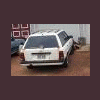
January 1, 200917 yr I have a legacy that the prev owner said right rear strut was broken. Does anyone have any That i can buy for a 94 Legacy fwd wagon. Here's a pic of the wheel as it sits: (cruddy quality sorry.) Need help ASAP if possible.
January 1, 200917 yr From the picture, it looks like the wheel is towed in. Suggest getting the car up on a lift to see what is broke or bent. I would not so much think that there is a problem with the right rear strut, as probably a bent suspension issue. I bet the previous owner knows what caused this. A good slide side ways with some speed, with an abrupt slam into a curb would be a good way of causing the tow in damage.
January 2, 200917 yr From my experience in the shop, I would also look at the other suspension pieces. Struts will usually not bend, but will move with the rest of the wheel. Looks more like a trailing arm/control arm being bent. I would also get it in the air or look at it froma creeper.
January 3, 200917 yr strut is bent, as well as the lower control arms, ill put money on it. i see ALOT of bent struts on the cars that come into my work, subaru wrecking yard. if you find out what you need for sure i have it all in stock so PM me.

Please sign in to comment
You will be able to leave a comment after signing in
Sign In Now