
Leaderboard
-
Numbchux
Members3Points7630Posts -

heartless
Members2Points4647Posts -
idosubaru
Members2Points26995Posts -
brus brother
Members1Points2889Posts



Popular Content
Showing content with the highest reputation on 02/26/20 in Posts
-
Rather than remove it, can you just disconnect the wire to the switch? If the lights go out when you do that then this may help diagnosis. And then someone/mechanic could test the switch operation with a digital multimeter at that disconnected wire. Just stick the probe(s) in the connector and see if the switch turns on and off properly or has erroneous readings.2 points
-
first thing to do would be to check if the CEL is on - if it is, there are stored codes that need to be read. those can often help point you to what might be wrong If you do not have an OBDII code reader, most chain auto parts stores will read the codes for free - if you can get the car to them. They wont clear them, but will tell you what they are. If there are codes, make note of what they are, in the order they appear - will usually be in a "PXXXX" format with the Xs being numbers.2 points
-
1 pointNot much I can add here.... But FYI, a 2011 OBS will be a 4-speed 4EAT transmission. Last year in the Impreza chassis.1 point
-
1 pointEt voilà Doesn’t look like a huge difference in these pics. Front is not done yet.
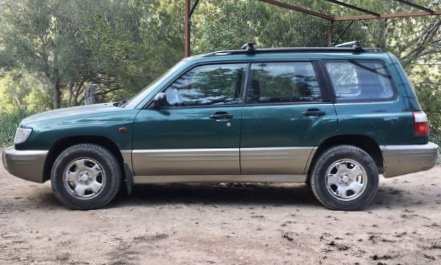
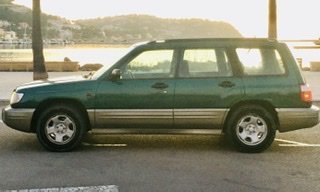 1 point
 -
1 point"when you punch it", what if you roll gently into the throttle? It's completely normal for an electronically controlled transmission to skip from 4th to 2nd in necessary situations.1 point
-
Yes, when changing ride height, the "correct" procedure is to loosen the bolt for any bushing that twists around the bushing during travel and retorque it at ride height.1 point
-
not a subaru but I think you are heading in the right direction.1 point
