June 1, 201411 yr Did this swap over last cupple weeks 2.2 from 92 turbo legacy and high low five speed from gl in my 98 outback sport. Took some doing but works well. Had to upgrade to outback injectors and change xross members. have been driving it for a week now is very fast. And I have 2wd and low range loving the 2wd mode
June 1, 201411 yr Which two wheels are you driving, front or rear? How does the center diff handle that?
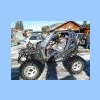
June 3, 201411 yr Author Fwd using a 87 gl high low. Had to use front driveshaft 1/2 from 04 forester with rear half from 02 legacy sedan to get right length homemade xross member. The impreza efi seems to like its turbo engine no check engine lights and good performance. With the outback 2 inch lift and my 225 70 15 bfg km2s this car works well. Will see if can get some pic's. Is this years test bed car
June 3, 201411 yr The impreza efi seems to like its turbo engine r you did this with the original impreza non-turbo ECU?
June 3, 201411 yr Very nice work. Not sure what the Ford badge on the grill is all about?? Maybe because of some Ford body work or bumper??
June 10, 201411 yr Author So now looking for a 2 - 4 inch body lift to add to the outback sus lift throw me some ideas guys who sells good lift kits ?

Please sign in to comment
You will be able to leave a comment after signing in
Sign In Now