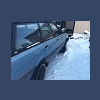
August 24, 201411 yr 85 ea82 wag carb is there a cat in the y pipe, im pretty sure there is but i cannot remember.. anyways i want to gut mine if there is one anyone have any ideas on how to go about it? pretty sure its clogging up.. 220k and atleast three trips from ak to fl and back, according to car fax the floor is getting alot hotter than it used to and im losing power... also i do smell the bad cat rotten egg smell every now and then i already know how to gut the other cat, and its on my list Edited August 24, 201411 yr by AKghandi
August 27, 201411 yr "is there a cat in the y pipe, im pretty sure there is but i cannot remember.. anyways i want to gut mine if there is one anyone have any ideas on how to go about it?" Remove front Y-pipe from car. Cut rear pipe to get at catalyst bed. Drill thru with long twist drill bit, then punch thru remainder with a pipe & hammer. Empty out pieces. Weld rear pipe back in place. PM'd you about those new OEM pipes for the Y but you aren't interested it seems. Guess they'll go on fleabay now.
August 27, 201411 yr Author yeah sorry I just cannot afford that right now. that method would work but i dont have a decent welder.

Please sign in to comment
You will be able to leave a comment after signing in
Sign In Now