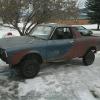
October 24, 201510 yr Hey Guys, don't know if any of you remember my 78 brat that i built a while back. still have it and still plan on keeping it but for now i got a new little daily/project. 1981 VW rabbit with the 1.6 diesel and a 5 speed. gets 50mpg in town all day long, im picking up a turbo for it here soon. I've tried the VW forums but they are mostly negative, i remember liking this forum really well so here i am! Edited October 24, 201510 yr by RustyBrat
October 25, 201510 yr Stinky, noisy, and indestructible. Try the Vanagon boards for some assistance as I think they use the same diesel engines.
October 25, 201510 yr Try this http://www.vwdieselparts.com/forum/index.php?sid=58d9bbd6eb57866e06a144effd11b387
October 25, 201510 yr my brother had an '84 GTI in HS. I think it was a 1.8L. Previous owner turned it into a street legal ice racer, had a tuned up engine with Cams and a 'cold running switch' that did seemingly nothing.. pile of garbage really, but reasonably quick and with his mediocre driving skills, It's a wonder that car didn't kill him
October 27, 201510 yr My cousin had one of these and so did my brother. Could drive 200 miles and the needle would barely move! Will it have to cheat emissions? :-P

Please sign in to comment
You will be able to leave a comment after signing in
Sign In Now