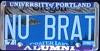
August 16, 200322 yr Ok... well since I needed sheet metal and revealed my project, and therefore changed my signature.... people know I have an 82 brat.... However a select few have seen the pics (subie gal, ezap, general disorder, and hondasucks) So... for the rest of you... here is my OTHER baby.... (going up for sale when done though... I want a newer one as a keeper)
August 16, 200322 yr Hah, I saw it over at Zaps when we stopped at the end of the Wcss5 show:brow: Rob
August 16, 200322 yr Author I figured the pics would be circulating... I told eric it was ok after I had to blab what I had when it came to getting new sheet metal for the door sills... oh well... I will have a REAL secremobile someday.... it just better be a non rusty virgin
August 16, 200322 yr Wait a minute - don't you mean you saw MY new BRAT? Was Flo's there too? I'm confused. GD
August 16, 200322 yr Author Zap was the first recipient of pics of my brat... since he is one of the lifting experts

Please sign in to comment
You will be able to leave a comment after signing in
Sign In Now