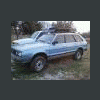
December 24, 200817 yr i saved this off the old board it had with it a build along for the bumper.http://s257.photobucket.com/albums/hh236/cowboyroy_album/
December 24, 200817 yr wrong link mate.......gottsta fix it sos we can see!it might be mine.cheers, brian
December 24, 200817 yr In your photobucket album settings, you will have to change it to "make public". Once thats done, let us know, and we can veiw the goods..
December 25, 200817 yr Author Thank you very much sir ,i just got reunited with my future front bumper thanks danny
December 25, 200817 yr Awesome Brat! Unfortunatly it's just a pile of rust now. Did he sell it whole or part it? It was on Ebay a few months ago.
December 25, 200817 yr Yeah he had some under body shots when it was on ebay a few months ago. Pretty rough sight to see too. That was the biggest thing hurting his auction.
December 25, 200817 yr Sad to hear that about Scott's BRAT. He put alot of time, money, and work into that Beast. He hasn't been on here for quite some time now, and no new info on his site in ages either.

Please sign in to comment
You will be able to leave a comment after signing in
Sign In Now