
Leaderboard
-
1 Lucky Texan
Members3Points10144Posts -
idosubaru
Members1Points26995Posts -
1980ea71Brat
Members1Points106Posts



Popular Content
Showing content with the highest reputation on 06/14/22 in all areas
-
more searching online seems to point to the purge valve; https://www.youtube.com/watch?v=ZP5gPigl6NQ2 points
-
Check evap canister, valves (such as purge valve mentioned), and lines. Don’t top off the gas.1 point
-
try a squirt of starting fluid immediately - when it's running rough? at least we'd know if it was fuel-related...? or, next time you feel it would fail, do a few OFF to ON (not START) key cycles. wait for a 3 count at ON, then go to OFF, back to ON, 3 count, etc. - quickly. That runs the fuel pump and should fully pressurize the rails....? you said you can detect a little air movement...wonder what would happen NOT at fueling, but say right now you removed and replaced the gas cap? would it start smoothly?1 point
-
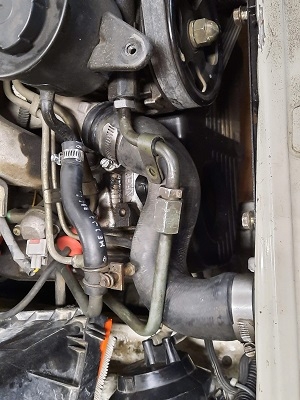
1 pointLastly I got the power steering lines in but they are too long to flow naturally with the rest of the engine cavity. I am going to get these shortened correct at a shop in the future after the car is sorted enough to make real journeys. And then I also got the rest of the exhaust on it (up to the 2nd 02 sensor) and I took the car on it's maiden voyage!. No leaks so far from anything. Nothing too crazy just a couple miles to the gas station and back. Satisfied how everything has worked out so far.
 1 point