'86 oopsie
Members
-
Joined
-
Last visited
-
Yeah, sorry I did'nt get into detail like I should have:-\
-
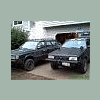
I currently own Scotts old Legacy, it has 4" blocks in the front with 2" blocks in the back and Outback struts on the back only.
-
No jumping, just average wheeling. I have an AA 4" lift, and the bolts through the "triangle" parts that support Tranny and control arm stabilizer have pulled out of the body...... and taken part of the underside of my car with them.
-
Its ripped,no rust at all......
-
Due the lift or wheelin' to hard:confused:, my tranny mounts have torn out of the body of my car. Has this ever happened to anyone, if so how did you fix it?? Thanks, Nate
-
during late spring/summer ninjaben43 and I go to tahuya almost every weekend..... but that looks like a long way for you:headbang:
-
that is sooooo pretty:eek::eek:
-
bad a$$:headbang:
-
that car is f-in' sick:headbang::headbang::headbang:
-
gggrrrrrrrrrrr:headbang:.............................................. call me
-
:headbang: :headbang: ........yup thats the one
-
'86 oopsie replied to '86 oopsie's topic in 1990 to Present Legacy, Impreza, Outback, Forester, Baja, WRX&WrxSTI, SVXwhen i got the car, the previous owner had not tightened the pulley down good enough, so it wobbled to the point that it mushroomed the key and completly F-ED the pulley nate:headbang:
-
'86 oopsie replied to '86 oopsie's topic in 1990 to Present Legacy, Impreza, Outback, Forester, Baja, WRX&WrxSTI, SVXthanks for all you help:headbang: nate
-
'86 oopsie replied to '86 oopsie's topic in 1990 to Present Legacy, Impreza, Outback, Forester, Baja, WRX&WrxSTI, SVXyes it was wobbling, thats why I took the pulley off. the key is whats haggard, i already have a new pulley, i'm just trying to figure out how to get the woodruff key out of the crank gear:confused:
-
the crank pulley key on my '94 legacy is f-ed and i cant get it out:confused: , any ideas that would help? i'm in dire need of advice:confused: thanks in advance, nate:headbang: