Skip to content
View in the app

A better way to browse. Learn more.

Ultimate Subaru Message Board

A full-screen app on your home screen with push notifications, badges and more.

To install this app on iOS and iPadOS
  1. Tap the Share icon in Safari
  2. Scroll the menu and tap Add to Home Screen.
  3. Tap Add in the top-right corner.
To install this app on Android
  1. Tap the 3-dot menu (⋮) in the top-right corner of the browser.
  2. Tap Add to Home screen or Install app.
  3. Confirm by tapping Install.

jannhall

Members
  • Joined

  • Last visited

  1. I have never reached a 100k mileage on my car. I do replace mine every four years. I feel like a car with a higher mileage requires high maintenance.
  2. Welcome aboard! I found a similar thread, the only difference is the model that was mentioned: https://www.subaruforester.org/threads/16-wheels-on-2014-forester.630233/
  3. That will be this weekend, make sure to share a photo so we can see what happened.
  4. It's been two weeks since the last update, how was it going?
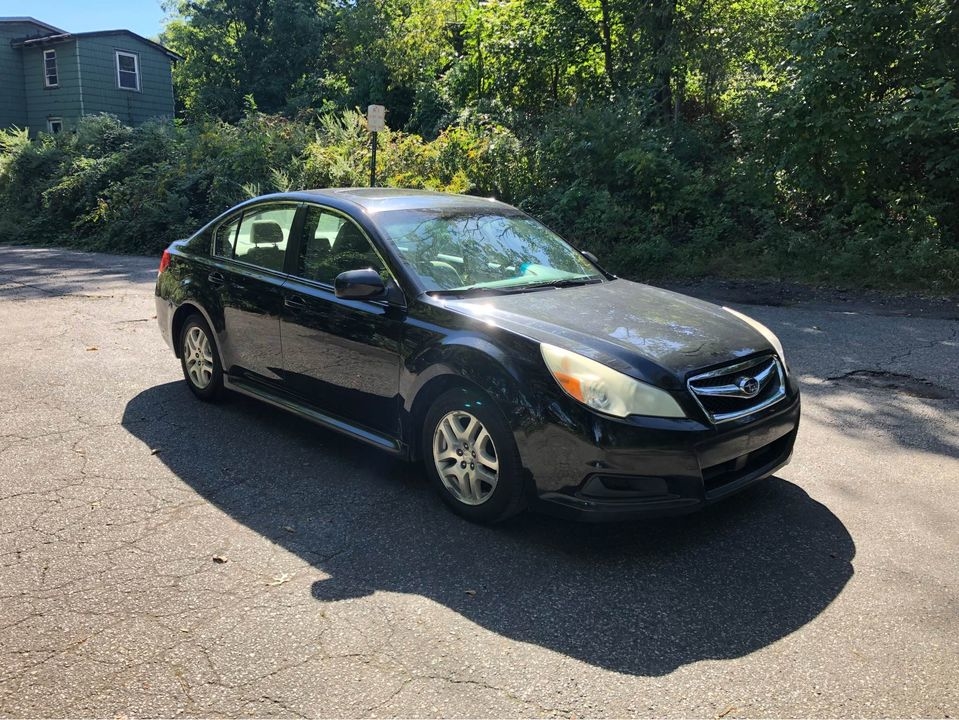
  5. This post will serve as my introduction to this forum. Attached is a photo of my Legacy.

Account

Navigation

Search

Search

Configure browser push notifications

Chrome (Android)
  1. Tap the lock icon next to the address bar.
  2. Tap Permissions → Notifications.
  3. Adjust your preference.
Chrome (Desktop)
  1. Click the padlock icon in the address bar.
  2. Select Site settings.
  3. Find Notifications and adjust your preference.