November 23, 200916 yr Does anybody know this place? As I understand it is still active, the pictures show some interesting cars... http://forums.vwvortex.com/zerothread?id=2810829&page=1
November 24, 200916 yr As I recall we all puked over this already. I'm pretty sure the yard is now gone. Very sad.
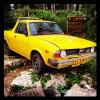
November 24, 200916 yr reported to have crushed all but 100 that were moved to the new location. that was a pretty awesome BRAT..
November 27, 200916 yr I'm pretty sure the yard is now gone. Very sad. The vortex thread said the yard was being cleared to make room for a housing development. In '06 that probably sounded like a good idea.
November 28, 200916 yr That was the first pic I ever saw of an FF-1. But yes, that yard has been gone for like 5 years now...
November 30, 200916 yr I know of an old FE (late 70's two door coupe, I think that's the FE?) in Arizona... complete, no rust, no dents. No windshield, so the interior is kind of...... Ran about 6 years ago when parked, but didn't have brakes, is the story. If I bring a big enough truck to tow it back off the reservation, I bet I can get it. It was the grandmother's car, and she just passed away last year, so they're not quite ready to let it go for free... but, how much would someone buy it for?
December 24, 200916 yr ... that was a pretty awesome BRAT.. I Agree, Absolutely. Could I Ask Why a Nice Lookin' Brat that seems to have a Recent Paint Job, will end in such Place like That? Kind Regards.

Please sign in to comment
You will be able to leave a comment after signing in
Sign In Now