Skip to content
View in the app

A better way to browse. Learn more.

Ultimate Subaru Message Board

A full-screen app on your home screen with push notifications, badges and more.

To install this app on iOS and iPadOS
  1. Tap the Share icon in Safari
  2. Scroll the menu and tap Add to Home Screen.
  3. Tap Add in the top-right corner.
To install this app on Android
  1. Tap the 3-dot menu (⋮) in the top-right corner of the browser.
  2. Tap Add to Home screen or Install app.
  3. Confirm by tapping Install.

Painted engine bay

Featured Replies

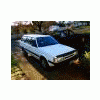
Dude here, I'm beginning my EA to EJ swap on my 92 Loyale. Decided to paint the engine bay based on the state/color of the battery tray and since white is the best color for rattle can. This was a quickie of a paint job and it shows, but white is so overwhelming, it doesn't really matter. Here's some pics 


post-30624-0-06087600-1401329914_thumb.jpg

post-30624-0-01683400-1401330137_thumb.jpg

post-30624-0-07263800-1401330174_thumb.jpg

post-30624-0-67789200-1401330215_thumb.jpg

post-30624-0-19633500-1401330264_thumb.jpg

post-30624-0-01506400-1401330329_thumb.jpg

post-30624-0-81098100-1401330374_thumb.jpg

post-30624-0-82254100-1401330406_thumb.jpg

Looks good.   I have considered painting my engine bay... but I don't seem to have the dedication that you have when it comes to de-greasing.

Did you finish it with one can?   How many coats?

These engine bays are so fresh looking. I cant wait to wire tuck my engine...

  • Author

One can of Rustoleum pro high performance enamel (about 4 quick coats) and a few coats of Rustoleum rubberized undercoating for the battery tray.


Tips: prep is everything (taping)


Thanks for the comments/views fellow subie enthusiasts 

It looks great! It's not easy to mask around all of the lines, harnesses, and grommets. Your attention to detail shows. Thank you for sharing the pictures.

Edited by Crazyeights

Please sign in to comment

You will be able to leave a comment after signing in

Sign In Now

Account

Navigation

Search

Search

Configure browser push notifications

Chrome (Android)
  1. Tap the lock icon next to the address bar.
  2. Tap Permissions → Notifications.
  3. Adjust your preference.
Chrome (Desktop)
  1. Click the padlock icon in the address bar.
  2. Select Site settings.
  3. Find Notifications and adjust your preference.