October 17, 20205 yr Just an old guy from Montana living the good life. Just wanted to say hi to everyone. I have a question about my Subaru but I want to put it in the right category.
October 17, 20205 yr Welcome mate. What sort of Subaru do you have? It’ll either be EA or EJ - that’ll give us a big clue. Cheers Bennie
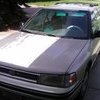
October 18, 20205 yr Your bio reads well enough , thanks for that. 1990 2.2 , that’s the one you’re talking about , yes ? We currently still run three of those cars (90-94 Legacys). I’m a little behind you at 57. Let us know what they’re doing. Or maybe you did elsewhere and I haven’t seen it yet.
October 18, 20205 yr hey neighbor! im down in Hamilton. owned a shop in Florence for 7 years. ive got a small fleet of subies down here. let me know if you need any help!
October 21, 20205 yr Author Thank You, Dan. I tried again today I put PB Blaster on it. Will not budge. I will get back to you Thanks Bob
October 22, 20205 yr Welcome Bob. I'm here in Missoula as well. Lost of great info and people here on usmb!

Please sign in to comment
You will be able to leave a comment after signing in
Sign In Now