July 29, 200421 yr Looks Very Good Articutated....... I need To get the # Of the Guy who Helped you put that thing together........HaHaHahahahahaha Wish I Could be there to see it in the trails the first time out.....Take pics...... John......
July 29, 200421 yr Hey Qman, Can you do us Aussies a favour, we are having a who's bigger than who comp over on AuSubaru right now. When your brat is sitting on level ground, what is the measurement from the concrete to the sill just in front of the rear tyre? http://www.ausubaru.com/ausubaru/html/modules.php?name=Forums&file=viewtopic&p=1893 Thanks
July 30, 200421 yr Have you made any plans on returning to the Rubicon with it? Still looks odd with a straight axle in the rear, but I can definatly see the benefits. Great job -Brian
July 30, 200421 yr sssssssswwwweeeeeeeeeeetttttttttttttt!!!!!!!!!! :slobber: need to get ahold of you ken! i must have written down your email wrong when i left the boat... cause it won't send any email to you. it comes back saying it's a non existant email. i need to talk to you about porjects.... i'll PM you! all i can say is it's awesome! when is the debut offroad trip pictures coming??? Semper Fidelis, Jared
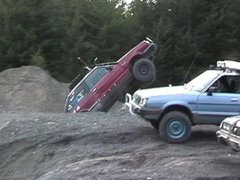
August 1, 200421 yr Author Well, I hit Evans Creek today. I am happy with the way the Brat is set up. It handled the very eroded terrain OK. Definately needs to be locked up in the rear. Had to right a rolled full sized Chev and get the same straightened out on the trail. The winch sure worked well. Met some very cool folks that are associated with S.N.O.R.T. They were very impressed with the new look Brat. The gearing is perfect. Can't wait to be lincolned or better. I'll post some pics later,
August 1, 200421 yr Author Not licensed right now. So, it is a trailer KING for now. LOL http://www.ultimatesubaru.org/photos/showgallery.php?cat=562 These show the Chev on the trail. Only one of me going in though.

Please sign in to comment
You will be able to leave a comment after signing in
Sign In Now